


2houses | Co-Parenting App
3.2127.00 Reviews
App Specs
- Version
- 4.10.12
- Updated On
- License
- Free
- Downloads
- 100,000+
- Developer
- 2houses
- Categories
- Parenting
- Platform
- Android
Screenshots
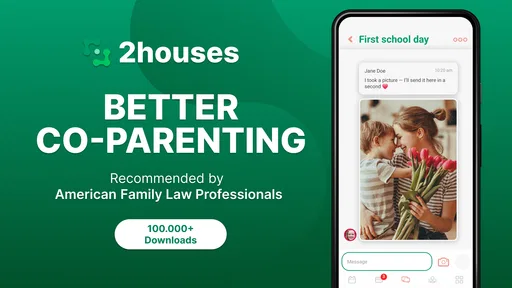
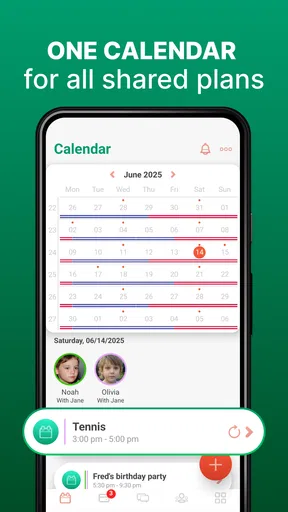
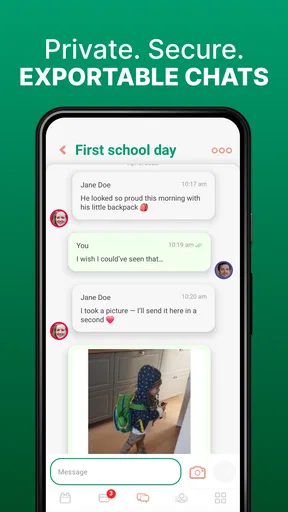
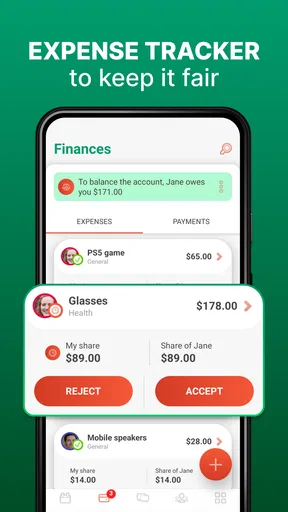
 Analysis by AppCompare
When two households are trying to coordinate a child’s week, small misunderstandings can quickly become bigger problems. I look at 2houses as a shared workspace for the practical side of co-parenting: schedules, costs, key information, and conversations that otherwise scatter across texts and email. The real test is not whether an app can hold those details, but whether both parents can use it consistently and feel comfortable with what they put there.
Trust begins with shared expectations
Because a co-parenting organizer can bring sensitive family information together, I would agree on how to use it before filling it with personal details. Decide what belongs in the shared space, who will keep records current, and which topics are better handled face to face or through another channel. That conversation matters as much as the software: a shared calendar is only useful when both people treat it as the same source of truth.
2houses is a parenting app from developer 2houses. It is free to download, has in-app purchases priced from $17.99 to $169.99 per item, and is rated for Everyone. Its average rating is 3.2 from around 580 ratings, with more than 100,000 installs. Those figures suggest a substantial audience, but they are not a substitute for deciding whether its approach fits your family. The app’s current version is 4.10.12, and it supports devices running Android 7.0 or later.
What I would check before sharing information
The app’s core appeal is that both parents can work with shared tools rather than maintaining separate versions of the same schedule or expense record. But I would not assume that a shared workspace automatically answers questions about account access, privacy, or what happens to information over time. Before entering medical, school, or financial details, read the current in-app privacy and account information and make sure both parents understand who can see the shared material.
There is a useful distinction between information that needs to be available to both households and information that can stay elsewhere. A pickup time or reimbursement record may be appropriate for the shared organizer; a highly sensitive document may deserve a more deliberate decision. I would start with the details needed for the next few weeks, then expand only when both parents are comfortable with the routine.
First Impressions
When I first launched the 2houses app, I was greeted with a user-friendly interface that’s both intuitive and visually appealing. The design is clean, with a focus on functionality over frills, which I found refreshing. It didn’t take long for me to get the hang of navigating through the various features. The app is available on both Android and iOS, making it accessible to a wide range of users.
Features Galore
The app comes packed with a variety of features that aim to cover all aspects of co-parenting. Let’s break down some of the most noteworthy ones:
Worth Reading Before You Choose

Flipboard Shows What News Apps Must Do Beyond the Feed

Switching to Android Auto Means Rethinking Your Driving Routine

Google Calendar Makes a Crowded Week Easier to Manage

Ludo King Makes the Most of the Minutes Between Plans

Baby Panda World Brings Quick Play to Modern Phones, but Its Game Library Feels Busy

ESPN’s Live Game View Makes Following Close Games Easier
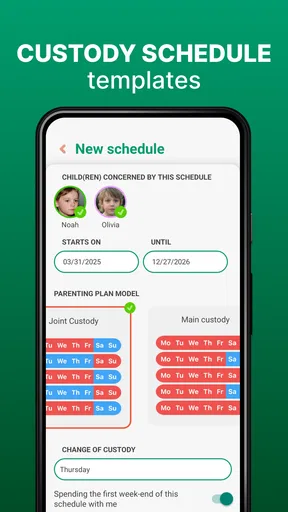
- Shared Calendar: This is a lifesaver for keeping track of events, appointments, and custody schedules. You can easily add and edit events, and both parents receive notifications for any changes. No more double-booking or forgotten commitments!
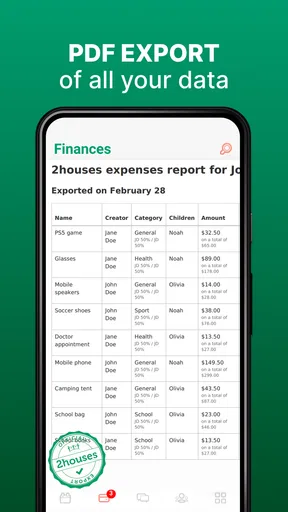
- Expense Management: Managing shared expenses can be tricky, but 2houses simplifies this with its expense tracking feature. You can log expenses, attach receipts, and even categorize them for better organization. Plus, there’s an option to propose how costs should be split, which can help avoid misunderstandings.
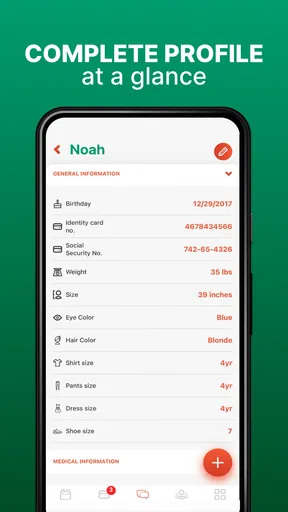
- Information Bank: The app allows you to store important information like medical records, school reports, and contact details. Having all this info in one place is super convenient, especially in those "I need it now" moments.
- Messaging: You can communicate directly within the app, which helps keep all co-parenting discussions in one place. This feature also ensures that communication remains focused and relevant.
Making the shared calendar work
A calendar helps most when it answers the practical questions that cause last-minute confusion: where a handoff happens, who is responsible for transport, and whether an appointment changes the usual routine. I would add those details when they matter instead of relying on a bare event title. That turns the calendar from a list of dates into a usable handoff plan, while avoiding long message threads about the same event.
For example, if a school activity falls during one parent’s time but requires the other parent to drive, record the event and the transport arrangement together. If plans change, make the edit in the shared calendar and use messaging to clarify anything that needs discussion. That simple division—calendar for the current plan, messages for context—makes it easier to find the final arrangement later.
Notifications can help draw attention to changes, but I would not treat them as proof that the other parent has read or agreed with every update. For a time-sensitive change, send a direct message as well and make the requested action explicit. This is a small habit, but it avoids confusing a calendar edit with an acknowledged agreement.
Expenses need a clear routine
Expense tracking is more useful when parents agree on the process before a bill arrives. Decide what information to include, when a receipt should be attached, and how to describe a proposed split. A short, consistent note—what the cost was for and when it was paid—can make a record easier to understand months later, especially when several school or activity costs look similar.
The option to propose a split is helpful for keeping a discussion attached to the expense itself, but a proposal is not the same thing as mutual agreement. I would use the record to make the amount and rationale visible, then keep the conversation civil and specific if the other parent disagrees. If you need formal accounting, detailed spending analysis, or a record built for a legal process, do not assume a family organizer will replace a dedicated accounting or professional system.
Getting Started
Setting up the app was a breeze. I just needed to create a profile and invite the other parent to join. Once they accepted, we could both access the shared features. I appreciated the onboarding process, which included helpful tips and walkthroughs. It made diving into the app much less daunting.
Start small, then build the habit
I would avoid trying to move every old message, document, and expense into a new app on the first day. Begin with the next custody dates and the upcoming appointments, then add a few current shared costs. This gives both parents a chance to learn where information belongs without turning setup into a second job. Once the basic routine feels clear, decide whether the information bank is useful for the records you actually reach for.
That approach also helps answer a practical question: does the other parent need to join for the app to be worthwhile? The shared tools are most valuable when both parents participate, so I would invite the other parent early and agree on a modest trial routine. If one person will not use the shared calendar or messaging, the app may become another place to check rather than a single reliable reference.
Real-Life Benefits
Using the app in real life, I noticed a few key benefits. For one, the shared calendar alone helped reduce the number of miscommunications significantly. Knowing that both parents are on the same page regarding schedules is a massive stress reliever. Additionally, the expense management tool helped us keep better track of shared costs, making financial planning much smoother.
Another aspect worth mentioning is the messaging feature. Having a dedicated space for co-parenting communication meant fewer texts and emails, which can sometimes get lost in the mix of everyday life. It also helped keep conversations focused, which is always a plus when discussing sensitive topics.
A realistic week-to-week use case
Imagine a child has a routine appointment, a school event, and a change to the usual pickup plan in the same week. One parent can put the appointment and event on the shared calendar, include the details the other household needs, and use a message to settle the pickup change. If either parent pays a shared cost connected with the week, logging it with its receipt gives the other person something concrete to review rather than a vague request later.
The benefit is not that every disagreement disappears. It is that dates, messages, and expenses can be kept close to the decisions they relate to. That can reduce the mental load of remembering which text contained the final pickup time or whether a receipt was already sent. The trade-off is that both parents must keep the shared record current; if they continue making changes only in private texts, the app’s calendar can become stale.
Where it fits among alternatives
Compared with a shared phone calendar, 2houses brings scheduling together with expense records, an information bank, and co-parenting messages. A standard calendar may be simpler if all you need is to coordinate dates, and it may suit parents who already have a dependable shared routine. Conversely, a collection of texts, email threads, and separate receipt photos can work at first, but it takes more effort to reconstruct what was agreed and when.
I would choose this app when the problem is fragmentation across several everyday tasks, not just a lack of calendar space. I would skip it if both households prefer separate tools, if only one parent is willing to maintain shared records, or if the situation calls for specialized legal, financial, or clinical support. An organizer can make logistics clearer; it cannot settle a dispute by itself or replace professional advice.
Room for Improvement
No app is perfect, and 2houses is no exception. While the features are robust, there are a couple of areas where I feel it could improve. For instance, the app occasionally lags, especially when loading the calendar. While not a deal-breaker, it can be a tad frustrating.
Moreover, while the expense feature is fantastic, it would be even better with more detailed reporting options. This could help parents analyze spending patterns over time, which is particularly useful for budgeting purposes.
Keep control of what you share
My cautious approach is to use the app for coordination first and add sensitive material only when there is a clear reason. Before uploading a record, consider whether the other parent needs the document itself or only the relevant date, contact, or instruction. For account questions, review the controls and information available in the app rather than assuming that shared access works like a private diary or that every item can be removed in a particular way.
It is also worth agreeing how to handle corrections. If an expense was entered incorrectly or an event changes, update the shared record and leave enough context that the other household can understand what changed. That keeps the shared space useful without relying on memory or expecting a message thread to explain an old calendar entry.
Final Thoughts
Overall, the 2houses app is a solid tool for any co-parenting duo looking to streamline their shared responsibilities. Its range of features caters to the everyday needs of co-parenting, and the intuitive design makes it accessible for everyone. While there are a few areas for improvement, the app’s benefits far outweigh any minor inconveniences.
If you’re navigating the complexities of co-parenting, I’d definitely recommend giving 2houses a try. It might just be the organizational ally you’ve been searching for.
My cautious recommendation
I would recommend trying 2houses when both parents want one shared place for schedules, messages, and everyday expense records, and when they are willing to agree on a simple routine for keeping those details accurate. Start with low-sensitivity logistics, check that the other parent can participate, and see whether the shared calendar and records genuinely reduce the back-and-forth in your week.
If your main concern is control over sensitive information, take time to review the app’s current account and privacy choices before adding it. If you only need a calendar, a simpler shared calendar may be enough; if you need formal financial tracking or help resolving conflict, a specialized tool or professional support may fit better. For the right family, this is a practical organizer—not a substitute for trust, communication, or clear agreements.
Pros
- User-friendly interface for easy navigation.
- Comprehensive calendar for scheduling events.
- Expense management feature simplifies tracking.
- Messaging feature keeps communication organized.
- Access for multiple guardians and family members.
Cons
- Limited customization for notifications.
- Some features require premium subscription.
- Occasional syncing issues reported by users.
- Interface can be slow on older devices.
- Lacks integration with third-party apps.
FAQs for 2houses | Co-Parenting App
What features does the 2houses app offer for co-parenting?
The 2houses app offers a comprehensive suite of features designed to streamline co-parenting. Key features include a shared calendar for scheduling custody and events, an expense management tool for tracking and sharing expenses, a journal for communication, and a photo album to share memories. These tools aim to reduce conflict and improve communication between co-parents.
Is the 2houses app secure and private for sharing personal information?
Yes, 2houses prioritizes user security and privacy. The app employs robust encryption protocols to ensure that all personal data and communications between co-parents are securely stored and transmitted. Only invited members can access shared information, providing a safe environment for managing sensitive co-parenting details.
How easy is it to use the 2houses app for someone who is not tech-savvy?
The 2houses app is designed with user-friendliness in mind, making it accessible even for those who are not tech-savvy. The intuitive interface and easy navigation ensure that users can quickly understand how to utilize its features. Additionally, the app provides helpful guides and customer support to assist users as needed.
Can both parents use the 2houses app if one parent lives in a different country?
Yes, the 2houses app is accessible internationally, allowing co-parents to manage their parenting responsibilities regardless of geographical locations. As long as both parents have internet access, they can coordinate schedules, expenses, and communications through the app, making it ideal for cross-border co-parenting.
Is the 2houses app compatible with both Android and iOS devices?
The 2houses app is available for both Android and iOS devices, ensuring compatibility across different smartphone platforms. Users can download it from the Google Play Store or the Apple App Store. This cross-platform availability allows both parents to stay connected and manage their co-parenting tasks seamlessly.


